
1. Why a Plain-Text Format From 2004 Still Runs Everything
Unless you deliberately avoid software, Markdown crossed your desk before lunch today. It was the README you skimmed before installing a dependency, the numbered plan your coding agent printed when a two-hour task finished, the client note that opened with a hash-marked title in your notes app. Most people who rely on Markdown daily never sat down to learn it, because the format won so completely that it turned invisible — the way email transport or zip archives are invisible. That invisibility is why a definition is worth writing: infrastructure you cannot name is infrastructure you cannot debug or strategically choose.
The format was born from a writing annoyance, not a research agenda. In 2004, publishing on the web meant hand-writing HTML — open a tag, close a tag, escape the ampersands — tolerable for engineers and miserable for writers. John Gruber, the blogger behind Daring Fireball, wanted to write in the plain-text conventions people already used in email — asterisks for emphasis, indentation for quotes — and publish without touching an angle bracket. With design feedback from Aaron Swartz, he released Markdown that year as a Perl script converting casual plain text into clean HTML, per John Gruber's original Markdown project page. The design goal stated there still reads as the format's constitution: a marked-up document should be publishable as-is, as plain text, without looking like it has been marked up with tags.
Twenty-two years later, the format runs READMEs, API documentation, entire documentation sites, static sites, release notes, and — the reason this article exists in 2026 — most of the structured text that AI agents produce for humans. If you operate a one-person business, Markdown is the connective tissue between your tools: the briefing your agent writes, the note you keep it in, the document you hand a client. Knowing what it is, where its dialects bend, and where it genuinely ends is a small investment that pays back daily.
2. Markdown Defined
2.1 The Core Definition
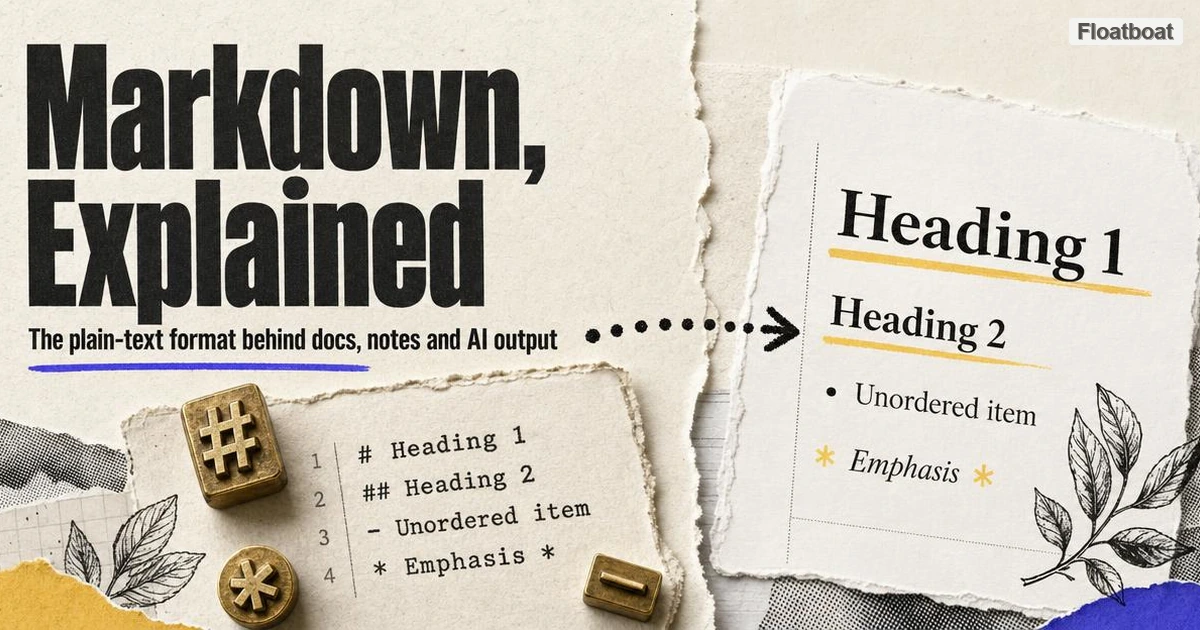
Markdown is a lightweight markup syntax for plain text: a set of character-level conventions that add document structure — headings, emphasis, lists, links, quotes, code — to a file that remains a normal, human-readable text document. A hash prefix marks a heading (# Quarterly Report), paired asterisks mark strong emphasis (**draft**), a hyphen starts a list item, and square brackets turn text into a link. A Markdown processor reads those cues and emits structured output, originally HTML, while the source file itself never stops being legible. In practice, "Markdown" now names three things at once: Gruber's original 2004 syntax, the family of dialects descended from it, and the ecosystem of .md files, editors, and converters built on both.
2.2 The Four Properties That Made It Stick
Markdown was not alone in 2004: Textile, reStructuredText, AsciiDoc, and various wiki syntaxes competed for the same job, several of them technically richer. Markdown won on properties that had little to do with feature lists — and those properties explain everything else in this article, from Git adoption to AI output.
- Readable at the source. The formatted document and the source document are the same artifact, so you can proofread without rendering and write anywhere.
- Line-oriented and diffable. Structure aligns with lines, so version control shows meaningful changes — why Git hosting made Markdown the native language of READMEs and pull requests.
- Tool-agnostic. A
.mdfile belongs to no vendor; switching tools is a file copy rather than an export project. - Durable. Plain text from 1984 opens today, and nothing about 2004 plain text fails in 2044. Text outlives the companies that ship binary containers.
None of these properties is rare alone; the compound is not. No competitor was simultaneously human-legible at the source, machine-parseable downstream, and owned by nobody, which is why the 2004 alternatives retreated into specialized niches instead of the mainstream.
2.3 What Markdown Is Not
The fastest way to understand the format is to draw its boundaries. Markdown is not HTML: HTML is the compilation target, the publish-time format browsers consume, as MDN's HTML documentation frames it, while Markdown is a source format optimized for writing by hand. It is not rich text: a .docx file or a Google Doc stores formatting the way a layout engine sees it and is edited inside the tool that owns it, whereas Markdown stores formatting the way a writer types it. And it is not one standard — a complication large enough for its own section.
It is also not a layout language, and pretending otherwise wastes afternoons. Markdown has no concept of columns, exact spacing, typography, or print pagination; for a designed brochure, a slide deck, or a pixel-faithful report, a design tool or a hand-built HTML page is the right drafting surface. What Markdown covers is the structural core of working documents — headings, emphasis, lists, links, code, quotes — which is exactly the part that survives copying between tools.
3. How Markdown Works: From .md File to Rendered Page
The mechanics fit in a three-step pipeline. You write a plain-text file, conventionally named with the .md extension. A Markdown processor — Gruber's original Perl script first, then engines like markdown-it and the CommonMark reference implementations — parses the character cues into document structure: this run is emphasis, this block is a list, this line is a heading. The processor emits structured output, most commonly HTML, which a browser or application styles with fonts and spacing the source file never mentioned.
Here is a complete working example, the kind of note a solo consultant writes before a client call:
# Client Brief — Northwind Redesign

**Owner:** Kostja — **Status:** draft

- Scope: landing page and pricing section
- Hard deadline: October 3

> Decision needed from client: testimonial placement.
Paste that block into any Markdown renderer and the hash line becomes a level-one heading, the asterisk pairs become bold, the hyphen lines become an unordered list, and the angle-prefixed line becomes a blockquote. Nothing else happens — no hidden metadata, no document database, no styling engine. All the formatting lives in a handful of visible, portable punctuation characters.
Two mechanical details explain most real-world surprises. Most engines pass inline HTML through to the output, so a stray unescaped < can silently swallow a paragraph — and how much raw HTML survives differs by engine, with chat and note applications stripping it for security. And because the syntax is punctuation, meaningful characters (*, _, #) occasionally need a backslash escape. These frictions mark the seams along which the next section's dialects split.
4. Markdown Flavors: One Name, Many Languages
The original Markdown was a brilliant syntax attached to one Perl script, and there it froze: version 1.0.1, released in December 2004, remains the last revision of Gruber's canonical implementation, and the syntax was never formally specified beyond its documentation. Real documents immediately outgrew it — people needed tables, wanted fenced code instead of indented code, and eventually wanted checkboxes in issue trackers. The community responded the way open source always responds to a frozen upstream: by forking.
Standardization arrived a decade later. CommonMark, launched in 2014, produced a precise specification plus a conformance test suite so compliant engines emit identical output — replacing "whatever the original script happened to do" with an actual standard, per the CommonMark project site. GitHub Flavored Markdown, the dialect most people write today without knowing its name, is defined by GitHub's GFM specification as a strict superset of CommonMark, adding tables, task-list checkboxes, strikethrough, and automatic link detection. If you have ticked a - [x] checkbox in a GitHub issue or drawn a pipe-character table, you were writing GFM, not Gruber's Markdown — a distinction that matters the moment your file leaves GitHub.
The practical consequence is that rendering differences are normal, not exceptional. GitHub, Obsidian, and Notion each handle the same file differently, as of September 2026: Obsidian treats double-bracket wiki-links ([[Another Note]]) as first-class navigation with its own callout syntax on top; Notion absorbs Markdown into a proprietary block model and re-exports it reshaped; Slack's formatting treats single asterisks as bold where standard Markdown would read italics. A perfectly valid file can look meaningfully different across the three apps you use in one afternoon.
The working rule for anything that must outlive the current tool is to write to the intersection: headings, emphasis, lists, fenced code blocks, links, and GFM tables cover nearly every working document and survive every engine named above. Treat wiki-links and app-specific plugins as local conveniences, not part of a document's permanent structure.
5. Why Markdown Matters More in 2026: It Became AI's Interface Format
The strongest argument for learning Markdown in 2026 is not that it is pleasant to write — it is that the format became the default language of human-AI text exchange, through three mechanisms that reinforce each other.
First, agents produce it unprompted. Ask a coding agent to plan a refactor or an assistant to summarize a contract, and the answer arrives with hash-marked headings, bolded figures, and bulleted next steps. No one made a product decision for this; the training corpus — GitHub READMEs, Stack Overflow answers, documentation sites — is saturated with Markdown, so Markdown is what models emit. For a solo operator, agent output arrives pre-structured for storage, diffing, and forwarding, in a format every other tool already speaks.
Second, every major chat surface renders it. That plan does not appear as literal asterisks in ChatGPT, Claude, or Gemini; it appears as formatted text, because the chat interfaces parse Markdown on the way in. Forum and messaging platforms made the same bet years earlier — Reddit, Discord, and Stack Overflow all adopted Markdown-style formatting, per Wikipedia's Markdown entry — normalizing the syntax for the audiences that later became heavy AI users.
Third, pipelines parse it. Retrieval-augmented generation systems — the architecture behind most "chat with your documents" products — commonly split incoming documents along Markdown's heading hierarchy, because headings are free, reliable chunk boundaries. A knowledge base written with discipline does double duty: humans navigate it visually, retrieval systems address it semantically. In my own workflow, notes with strict heading structure come back from an agent with noticeably better section recall than flat text — an internal observation, but it matches how the chunking works.
None of this makes Markdown the final word on AI output, and 2026's most interesting format argument came from the opposite direction. In May 2026, Thariq Shihipar, an engineer on Anthropic's Claude Code team, argued that for human-facing agent artifacts — implementation plans, code reviews, design references — self-contained HTML pages beat Markdown files, because a browser can render hierarchy, color, and collapsible sections that plain text cannot carry. We tracked how the "HTML is the new Markdown" argument unfolded, and the honest summary is that both sides are right about different jobs: HTML for polished deliverables reviewed once, Markdown for anything that must be diffed, versioned, chunked, or passed between tools. For setting format policy in your own agent workflows, our HTML vs Markdown decision framework breaks the choice down by audience and artifact type.
6. Markdown in Notes and Knowledge Management
The second territory Markdown quietly absorbed is personal knowledge management, and the flagship case is Obsidian. Every note in an Obsidian vault is a Markdown file inside an ordinary local folder — the purest expression of the format's promise: your knowledge base is not a row in a vendor's cloud database but a directory of text files you can open, search, sync, and back up with tools you already trust. Bear, Logseq, and Typora make the same local-plain-text bet, and even Notion — proprietary at heart — still imports and exports Markdown, because its users demand a door out.
For a one-person business the substrate has a specific payoff: agents can work it directly. A desktop agent with ordinary file access can read your meeting notes, append a follow-up, and update a project page without a single API integration, because a folder of Markdown files is a universal interface. Notes sealed inside an app's private database cannot say the same; there, automation is limited to whatever the vendor exposes.
The ecosystem also settles the capture question — how web research becomes durable knowledge. The pages worth keeping are HTML, and the notes live in Markdown, so the practical bridge is converting HTML to Markdown at capture time, stripping a page down to structure and prose that will still render in twenty years. Capturing once into plain text beats a folder of page snapshots for anything you intend to reread.
7. How to Get Started With Markdown
The practical good news is that daily Markdown is small. About ten constructs — headings, bold, italics, lists, links, inline code, fenced code blocks, blockquotes, tables, task lists — cover essentially every working document, and each is a character or two of syntax. Keeping a Markdown cheat sheet beside your editor replaces the tutorial phase: copy the pattern, adjust the words, repeat. The fastest on-ramp is migrating one live artifact — a project README, a meeting template, a client brief — rather than doing exercises in the abstract; muscle memory arrives within a week of writing something real.
The other half of the workflow is output, because a Markdown draft eventually has to become something a client opens without installing anything. The default path for polished documents is converting Markdown to PDF, which freezes formatting into the one file format every audience can open; when the reader needs navigation or visual hierarchy, the richer option is the single-file HTML route from section five. The rule of thumb is audience-shaped: .md for collaborators in Git or a notes app, PDF for external delivery, HTML when the document deserves to behave like a small web page.
You do not need to install anything to test the format first. Pasting a rough paragraph into Floatboat's Markdown toolbox and watching the conversion run both directions — plain text into structure, structure back into plain text — is usually the moment the syntax clicks, and it costs about ninety seconds.
8. Conclusion
Markdown is best understood not as a developer's formatting trick but as the lingua franca of structured plain text: readable by humans in any editor, diffable in any version-control system, parseable by any pipeline, and emitted natively by the agents that now draft much of the world's working documentation. The strategy that follows is short. Write to the CommonMark-plus-GFM intersection so files stay portable across engines, keep durable knowledge in plain local files rather than vendor databases, learn the ten constructs that cover daily work, and match output format to the reader — .md for tool users, PDF for clients, HTML when the artifact deserves it. Twenty-two years in, the boring choice is still the right one, and in 2026 it is also the choice your AI agents have already made for you.
https://floatboat.ai/blog/what-is-markdown