
File Organizer vs File Sorter vs File Renamer — Which to Buy
File organizer vs file sorter vs file renamer compared by the job each does, plus a five-question test to buy only the layer your mess needs.
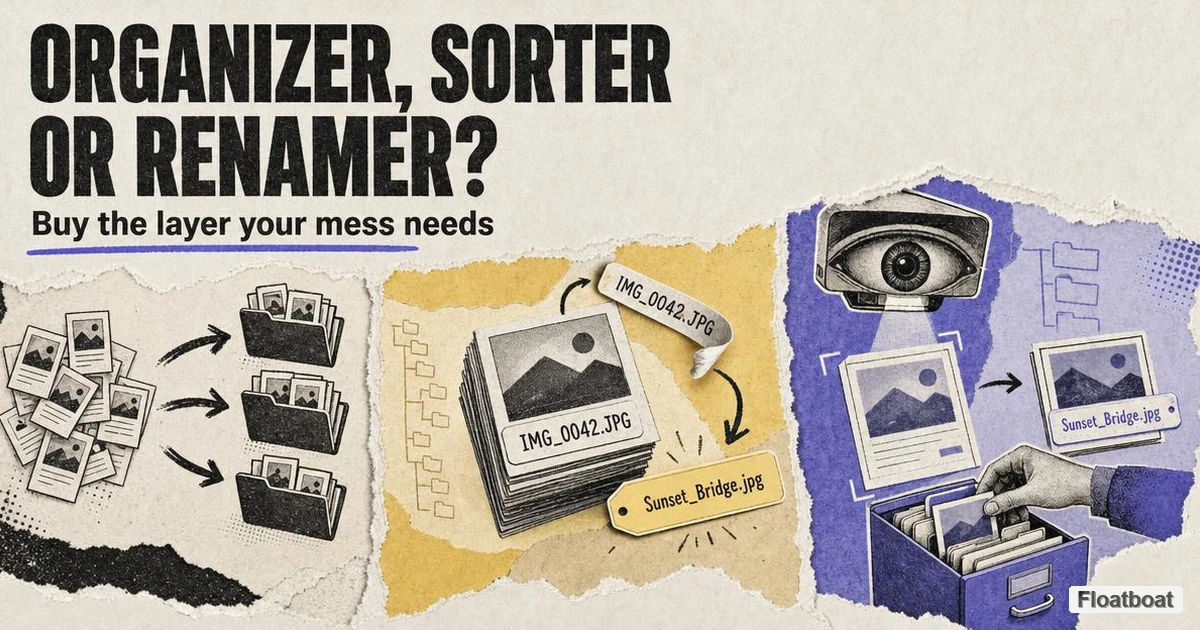
1. The Real Question Isn't "Organizer vs Sorter" — It's Which Job
People searching "file organizer vs file sorter" usually expect a product shootout: Sortio against FilesDesk, one winner to install this weekend. In practice the comparison that decides your outcome is between three jobs, and most tools are built for exactly one of them, whatever the landing page claims. We have a separate explainer for the category definition — what an AI file organizer actually is, including its data-boundary axes and what it is not. This article handles the decision layer: which form fixes the mess on your disk.
The framing matters because the three forms fail differently, and each fails in a way the other two cannot cover. A sorter is designed to group files fast by extension, folder, date, or filename — and it collapses when files that belong in different places share nothing on the surface. A renamer is designed to fix names while leaving your folder tree untouched — and it is useless the day your real problem is that no tree exists. An organizer reads content, then renames and routes in one pass — exactly right for a Downloads folder full of generic files, and exactly the wrong, expensive workflow for 3,000 consistently named photos that only need a date prefix. Each form answers a different question, so the first step of any purchase is naming your mess, not comparing logos.
2. Three Forms, Three Jobs — and Where Each One Breaks
Each form below is defined by the job it does and the boundary where it stops being useful.
2.1 File Sorters: Fast Grouping, Shallow Naming
A file sorter's core job is routing: it looks at filenames, extensions, metadata, and folder context, then moves files into groups, often into folders it creates for you; renaming is incidental. Open-source AI File Sorter by hyperfield shows the shape clearly: it suggests a category per file and proposes names only as a secondary step, and folders appear once you approve. Sortio's default layer works the same way — filename-and-metadata routing, with content reading offered as an optional, slower toggle rather than the default path.
The place a sorter breaks is the semantic gap. Sorting acts on signals you can point at — extension, size, date, name pattern — and the moment the information needed to file a document correctly lives inside it, the sorter has nothing to work with. IMG_2048.jpg and IMG_2049.jpg get grouped together even when one is a receipt and the other a screenshot. For genuinely name-based clutter — screenshots, downloads whose names describe content, media libraries — a sorter is the fastest, cheapest fix, often free, and frequently all you need.
2.2 File Renamers: In-Place Naming, Zero Restructure
A file renamer's entire contract is the filename. It reads what it can — for content-aware renamers, the file's actual text and pixels — and proposes a better name you review and approve, with the folder structure left exactly as it was. That is the positioning of nymos, which states it never moves, copies, or reorganizes anything and never renames without your approval — even its watch-folder mode only prepares suggestions. Zush takes the same form to a power-user extreme: 100+ supported formats, naming blocks and templates so you control the exact pattern, folder monitoring for repeat work, full undo history, and Cloud, BYOK, or local (Ollama/LM Studio) AI modes.
The renamer's boundary is the inverse of the sorter's: it perfects names but never repairs structure. Renamers also split into two sub-types worth noticing before you buy: pattern renamers like Bulk Rename Utility, which transform existing names via rules and metadata such as EXIF and ID3, and content-aware AI renamers, which generate names from what the document says. The former is instant, free for personal use, and unbeatable for mechanical jobs; the latter costs per-file inference but solves the "scanner named it scan_0042" problem no pattern tool can touch — buy the sub-type that matches whether your filenames are consistently bad or meaninglessly empty.
2.3 File Organizers: Read, Rename, and File in One Pass
A file organizer collapses the two previous jobs into one operation: it reads each file's content, renames it meaningfully, and routes it into a folder structure — often a tree it proposes and you approve before anything moves. FilesDesk pairs content-based renaming with organize flows that move files into date-structured folders; Sortio's flagship AI mode reads document text when enabled and returns a complete rename-and-route plan for the batch. For the taxonomy of what distinguishes this form, the category definition in our hub post is the reference; the rest of this article matches that taxonomy to your purchase.
The organizer's boundary is cost and scope. Because it runs an LLM per file — or a local model doing equivalent work — it is slower and per-file more expensive than a sorter or a pattern renamer, and overkill for the mechanical cases those tools handle. Several organizer vendors admit as much: Sortio caps its AI sorting runs at 5,000 files and tells users to move deterministic flows into its rule builder so they stop burning inference. Where the organizer earns its keep is the folder with no salvageable signals — unnamed scans and mixed downloads whose routing depends on what each document is, not what it is called.
3. Head-to-Head: Judging Each Pair on Real Failure
Feature tables tell you what a tool can do, rarely which job is primary or whether a capability is opt-in. The table below compares the three forms by failure boundary, not brand. Product examples and prices were rechecked on official pages on October 13, 2026.
| Dimension | File sorter | File renamer | File organizer |
|---|---|---|---|
| Job it actually does | Groups files into folders | Rewrites names in place | Reads content, renames, and files in one pass |
| What it reads | Filenames, extensions, metadata | Names + metadata; content-aware variants read the file | File contents by default (text, and for some tools images and OCR) |
| What it leaves alone | Often the names | The folder tree | Nothing — touches both, usually after approval |
| Fails when | The deciding signal is inside the file | The problem is that no structure exists | The job is mechanical and files are already named |
| Safety posture | Review is optional in rule flows | Approval-first is the norm | Preview-then-approve is the norm, with batch undo |
| Typical price shape | Free–modest, or bundled into rules | Free (pattern) to low monthly or one-time lifetime (AI) | Subscription or one-time; per-file AI cost or a local model |
| Representative tools | hyperfield AI File Sorter, rule layers of Hazel / File Juggler / Sortio | nymos, Zush, Bulk Rename Utility, FilesDesk naming mode | Sortio AI mode, FilesDesk organize flows, Floatboat |
Two caveats before judging pairs. First, real products sit on a spectrum — FilesDesk and Floatboat rename and route, and Sortio ships a rule builder next to its AI sorter — so "which form is this tool" is often a design question, not a category question. Second, the table describes typical architectures; what a tool does on your files is what a free trial exists to verify. Each pairwise comparison below targets the decision that actually separates the two.
3.1 Sorter vs Renamer: Structure First vs Names First
The sorter-versus-renamer question is really about which half of your problem is broken. Take a designer whose client folders are perfectly organized — Acme/, Globex/, each with briefs/, assets/, deliverables/ — but whose exports arrive named final2_FINAL_v3.png. Routing works fine; the names are the entire problem, and a renamer (content-aware or even pattern-based with a consistent convention) fixes it in minutes without touching the structure. Now the mirror image: clearly named files like Q3_influencer_brief.docx all dumped in one flat directory grown to four hundred files. A renamer cannot help — the names are already informative — while a sorter with simple date-or-type rules builds the missing tree. The rule of thumb: if the filenames describe the content, sort; if the folders describe the organization, rename. The failure to fear is buying a renamer because you resent your filenames when your actual pain is folder sprawl — you rename four hundred files and still cannot find anything.
3.2 Sorter vs Organizer: Same Goal, Opposite Depth
Sorters and organizers both build folder structure, which is why they are the two forms most often conflated under the "file organizer" label. The difference is reading depth, and it shows up as a difference in what each can route. An invoice named invoice_3847.pdf, a bank statement statement_2026-03.pdf, and a lease scan_0042.pdf are indistinguishable on the surface — same extension, arbitrary names, similar dates — yet a content-reading organizer can separate them into Finance/Invoices, Finance/Bank, and Contracts/Leases because it reads what each document is. A sorter looking at the same three files has roughly one sane option: group by extension or date, which reproduces exactly the shallow folder the user was trying to escape.
This is also where the honest cost comparison lives: spend content-reading only where the routing decision genuinely depends on the document. Choose a sorter when folders can be derived from names, dates, and types; choose an organizer when correct routing requires knowing what each file is — and verify on a trial that it reads the formats you actually handle (PDF text layers, scanned images via OCR, spreadsheets) before you commit.
3.3 Renamer vs Organizer: Stay Put vs Read + Route
The renamer-versus-organizer split is the sharpest philosophical divide in the category. One camp argues folders are obsolete: give every file a rich, searchable name and operating-system search becomes your organization system — close to Renamer.ai's stated thesis that you do not need more folders, you need files that describe themselves. The other camp argues names alone cannot scale, because search requires remembering a term while a browsable tree does not. A freelancer whose work lives in a few project folders and needs to retrieve "the revised contract from March" genuinely wins with descriptive filenames plus search. Someone who receives a continuous stream of heterogeneous documents — invoices, receipts, records, client deliverables — is better served by a tree that files each document by type and project, and a rename-only tool leaves the tree-building to them.
One recurring objection deserves a direct answer because it pushes people toward renamers: fear of an AI moving files. It is legitimate, and the renamer camp's "never move anything" guarantee is a real advantage — nymos advertises exactly that contract. But an organizer that previews the full rename-and-route plan, requires one click to apply, and offers whole-batch undo addresses the same anxiety before anything changes on disk. If you will never be comfortable with any tool moving files, buy a renamer and build your own folders; if you are comfortable approving a visible plan, the organizer's one pass saves the manual filing a renamer leaves to you.
4. Match the Form to Your Mess — a Selection Map
Pick the form whose job matches what is actually broken in your folders. These tools are not for files that live inside another application's database — notes in an Obsidian vault are organized by the vault, not by a disk tool, and cloud-synced folders are best handled by the sync layer's own rules rather than a tool racing it. The map applies to loose files — Downloads, Desktop, project dumps, external drives.
4.1 Three Kinds of Mess
Almost every messy folder is one of three kinds. The name mess is a usable structure with meaningless filenames — camera exports (IMG_2847.jpg), screenshots (Screenshot 2026-03-26 at 13.59.10.png), downloads (document(3).pdf). This is a renamer's job — our best AI file renamer roundup ranks the tools that do it — ideally a content-aware one, because the details that belong in the name (date, vendor, subject) exist only inside each file. The structure mess is the opposite: informative names spread across one flat folder or several overlapping ones, where only grouping is missing — a sorter, even a cheap rule-based one, builds the tree without per-file AI cost. The content mess combines both failures: generic names and no structure worth keeping, usually a Downloads folder that became a personal landfill or an external drive inherited from an old machine. Only an organizer that reads content can recover meaning there, because neither names nor folders carry any.
The tool's label matters less than this diagnosis, which is why diagnosis comes first. Open your worst folder and ask: if every filename suddenly became descriptive, would the folder be organized? If yes, the problem is structure and a sorter suffices. If no, and the folder is one flat pile, check whether existing names describe the files — if they do, a sorter still works; if not, you are in content-mess territory and no amount of renaming or light grouping saves you without a tool that reads the files.
4.2 The Five-Question Self-Test
Run these against your single messiest folder before comparing prices:
- Do my files live in folders that already make sense? — Yes: the problem is names → renamer. No: continue.
- When I read a filename, do I know what the file contains? — Yes: → sorter (surface rules are enough). No: continue.
- Does correct filing depend on what each file is (invoice vs lease vs tax form)? — Yes: → organizer. No: a sorter still works.
- Am I willing to review a full plan and click approve before files move? — No: pick a rename-only tool that guarantees zero movement.
- Will this be a recurring flow (daily downloads, weekly scans) or a one-time purge? — Recurring: prefer watch folders or rules that run unattended after setup; one-time: a trial and a weekend are enough.
The test tends to collapse to a single decision: orderly trees → renamer; orderly names → sorter; neither → organizer. If you land on organizer but the price or privacy model gives you pause, remember that a rule engine such as Hazel on macOS or File Juggler on Windows runs the deterministic parts of a recurring mess with no per-file cost once built — many power users run both layers rather than either alone.
4.3 When One Form Isn't Enough: Layering
Once the primary form is named, two legitimate reasons remain to add a second tool. The first is coverage of a genuinely mixed folder: a typical Downloads folder is part structure mess (installers and screenshots with obvious names) and part content mess (unnamed PDFs that need reading). Handling it well is a two-layer job — deterministic rules or a sorter for the obvious files, an organizer for the rest — and vendors have begun to admit it: Sortio ships an AI Rule Builder next to its AI sorter so recurring patterns can be promoted out of per-file inference. The second reason is workflow automation: once files are organized and consistently named, they become inputs an agent can act on, the kind of agent-file pipeline described in our walkthrough of using an AI agent on your documents. Buy the primary layer first, run it two weeks on real folders, and add a second form only if the leftover mess justifies it.
5. The Traps Hiding in "Best File Organizer" Lists
Three marketing patterns systematically mislead buyers here.
5.1 One Product, Three Self-Labels
The most common trap is a product describing itself as sorter, renamer, and organizer depending on which page you land on. The tell is a homepage that titles the tool with one job while its feature pages and blog describe another job in the same workflow — not dishonest, since the tool genuinely does both, but a clear sign that "what form is this" is a design question. When a landing page claims all three jobs, ask which one is the default path and which is bolted on: a tool whose organizer mode is a per-file LLM read will be slow and costly for sorter-class jobs, and one whose renaming is pattern-based will not fix names that require reading the document. Judge a product by its deepest capability, not its broadest claim.
5.2 Rule Engines Are Not AI Sorters — and That's Fine
Rule-based automation — Hazel on macOS, with conditions and actions over names, dates, and file text plus AppleScript and shell hooks for power users, and File Juggler on Windows, whose if-then rules watch folders and move, rename, or delete — is often filed under "AI file organizer" in roundups because it routes files. It is not AI: rules match exactly what you specify and nothing else. But that is precisely its strength for the right buyer. Hazel and File Juggler run deterministically, cost nothing per file, and have done this job for years, remaining the correct tool when your folder logic is stable enough to write down ("PDFs older than 30 days in Downloads move to Archive"). The trap is buying an AI tool because it feels modern when your workflow is exactly the rule-shaped case where per-file inference is wasted money; the mirror trap is paying for AI on flows a one-line rule handles forever.
5.3 Lists That Rank Renamers, Cleaners, and Organizers Together
The third trap is the ranked list that mixes jobs. A single leaderboard scoring a renamer against a rule engine against a disk cleaner implies substitutes where there are complements — the confusion this article exists to clear up. When you read a best AI file organizer ranking, identify the job each entry actually performs, then discard every entry that does not match your diagnosed mess. Lists also weight the wrong criteria for your case: a one-time purge of 2,000 historical files rewards fast batches and an easy trial, while a daily inbox flow rewards watch folders and recurring rules over raw rename quality. Judge against your five-question answer, not the list's #1 badge.
6. What's Next for This Category
The most decision-relevant shift visible on October 13, 2026 is not that one form replaces another, but that products increasingly combine them. NudgeFile documents local processing on Windows; FilesDesk and Zush offer local-model options; Zush now also documents folder sorting in beta. The label on the homepage therefore matters less than the default workflow and active inference mode. Cloud by default with a local option is a different privacy posture from local by default, and a rename flow with optional sorting is different from a rename-and-route organizer.
The second shift is from single-purpose utilities toward agents that tidy a folder and then act on it. The open-source wave on Hacker News — projects like llama-fs and hyperfield's AI File Sorter — shows hobbyists converging on the same read-approve-apply pattern commercial tools standardized, and the frontier is moving from "organize this folder" to "organize this folder and then do something with it." That is where Floatboat's AI file organizer sits: fully on-device with no uploads, it negotiates the plan with you in plain language before anything moves, then keeps going — the same workspace can feed organized files into calendar-driven agents, FloatIM, and one-click skills. It is a different position from a folder-cleaning utility, and worth weighing only if you have the follow-on workflow. The third shift is consolidation — sorters absorbing rule builders, organizers absorbing watch folders — which makes the "what job am I buying" question harder next year, not easier. Buy for the job you have today; the tools are converging underneath you.
Conclusion
The decision framework, compressed: name your mess before you compare products. If your folders make sense and your names do not, buy a renamer and keep your tree. If your names describe your files but nothing is ever where you expect it, a sorter gives you structure cheaply. If both are broken — the Downloads folder no one can navigate, the external drive that survived three laptops — buy an organizer that reads content and shows you the whole plan before a single file moves, and verify it on your real formats during the trial. Most buyers who feel cheated by this category were not cheated by a bad product; they bought a correct tool for the wrong mess. Apply the five-question test to the folder that actually bothers you, buy only the layer that matches it, and treat every "best of" list as a menu of jobs rather than a ranking of substitutes.
If your mess is the content kind and you want to see an organizer read your files, propose a tree, rename them, and roll back the whole batch with one click if you change your mind, try Floatboat's AI file organizer on your messiest folder. It runs entirely on your machine.
Related posts

Organize Receipts with AI: A Verifiable Filing Template
Organize receipts with AI by verifying vendor, date, amount, currency, type, and invoice number while preserving originals and isolating…

How to Clean Up Downloads Folder with AI, the Safe Way
Clean up a Downloads folder with AI using a sample-first protocol, scoped prompt recipes, small-batch approval, recovery tests, and a…
AI File Organizer for Windows: How to Verify Offline Claims
Evaluate AI file organizers for Windows by model location, network traffic, preview, restore evidence, and OneDrive placeholder behavior.
https://floatboat.ai/blog/file-organizer-vs-file-renamer-vs-file-sorter