
Lark CLI: When to Use It — and When to Keep the Web App
Lark CLI automates Feishu workflows from the command line—but for solo operators, it's not always worth building. Here's how to decide.
Hi, I'm Kostja. Today I will share some new things with you. I was setting up a new workflow last month — nothing complicated, just wanted my Lark messages to feed into a task list automatically. Simple enough request, right? So I started digging into Lark CLI, and two hours later I was knee-deep in App IDs, OAuth redirect URLs, and token expiry logic.
I want to save you that rabbit hole.
This isn't a tutorial. I'm not going to walk you through installation steps — the official Lark CLI documentation does that better than I could. What I am going to do is share what I actually learned about whether Lark CLI is worth building with — especially if you're running things solo.
1. What Lark CLI Actually Does
1.1 Core Capabilities in Plain Terms
Lark CLI is a command-line tool for the Lark/Feishu Open Platform, covering core business domains like Messenger, Docs, Base, Sheets, Calendar, Mail, Tasks, and Meetings — with 200+ commands and 26 AI Agent Skills as of September 2026, per the official larksuite/cli repository. That's a lot of surface area, and it grows with almost every release.
In plain terms: it's a programmatic way to interact with your Lark workspace from a terminal or from an AI agent. You can send messages, read documents, manage calendar events, query contacts — all via commands rather than clicking through the UI. The AI Agent Skills are the newer part of the story: prepackaged task templates that let an agent do multi-step Lark work — draft a doc, summarize a thread, update a Base table — without you scripting every API call yourself.
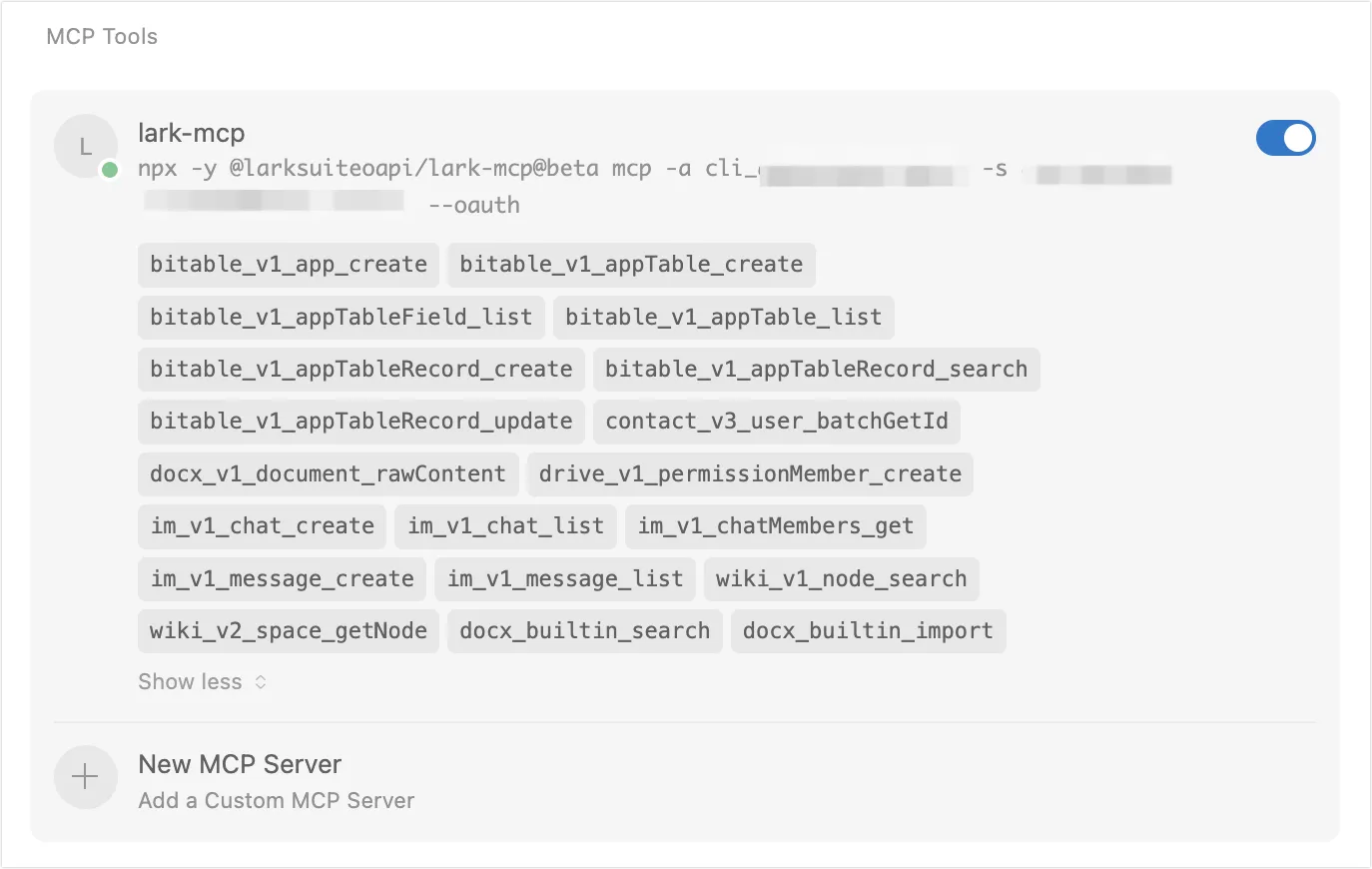
There's also a related tool called lark-mcp, which wraps these same APIs as MCP (Model Context Protocol) tools, allowing AI assistants to directly call Lark interfaces and implement automation scenarios like document processing, conversation management, and calendar scheduling. The two overlap in intent — machine access to Lark — but differ in shape: the CLI is a command surface you or an agent invoke directly, while lark-mcp is a tool layer an MCP-capable assistant loads.
1.2 Who It Was Built For (Mostly Developers)
Be honest with yourself here. This tooling is built for developers integrating Lark into larger systems — bots, internal apps, automated pipelines. The official Lark Open Platform documentation is thorough, but it assumes you're comfortable reading API reference docs and setting up credential flows.
That said, the ground is shifting a little. The CLI's own documentation now describes it as a tool "for both humans and AI Agents," and the built-in skills are clearly aimed at agent-driven usage — the barrier is quietly moving toward the agent-user side. It's the same drift we watched when Claude Code landed in non-developer hands: a developer tool whose audience keeps expanding past developers. Even so, as of today the comfortable path still assumes you've configured a webhook or read an API doc at least once.
If your mental model of "integration" is "drag this into that," Lark CLI is probably not your tool. But if you've built a webhook before, it might actually be approachable.
2. Why Solo Operators Search for It
2.1 What You're Actually Trying to Accomplish
Here's what I think is actually going on when someone like me starts looking up Lark CLI: we want Lark to talk to our other tools. We want to stop copying things manually. We want one less tab open.
The underlying goal is almost always one of:
- Pull data out of Lark (messages, docs, task updates) and send it somewhere else
- Push data into Lark from external systems
- Get notified when something specific happens in a Lark channel
Those are reasonable goals. And Lark CLI can technically accomplish all of them. The question is what it costs you to get there — which is really one slice of the broader math of whether a solo operator should be running agent-style automation at all: every self-built pipeline competes with the billable work it was supposed to protect.
2.2 Common Tasks That Seem Like a Good Fit — But Aren't
This is where people (myself included) get tripped up. Tasks like "send me a Lark message when my form gets a submission" sound like a 20-minute job. They're not, once you factor in:
- Creating a Lark app in the developer console (required — you need an App ID and App Secret before anything else)
- Figuring out which token type you need (
tenant_access_tokenvsuser_access_token) - Handling token expiry —
user_access_tokenhas a validity period of 2 hours and needs to be refreshed periodically - Configuring OAuth redirect URLs if your automation needs to act on behalf of a user
- Testing, then discovering a permission isn't enabled, then going back to the developer console
None of this is insurmountable. But it's more than one afternoon of setup, and each of those steps is a place where a non-developer simply stops.
3. The Real Cost of Building With Lark CLI
3.1 Setup and Maintenance Overhead
Let's talk honestly about time. Getting a basic Lark CLI integration running — something that actually does a useful thing reliably — probably takes a competent developer a full day. For a solo operator who isn't primarily a developer, double that conservatively. A close look at what a Feishu CLI setup actually involves in solo work tells the same story — the integration itself is the short part; the surrounding work isn't.
One important scoping before the numbers: the hand-rolled token management you'll read about applies to the route of bypassing the CLI and calling the OpenAPI directly from your own code. On that route, access credentials have a validity period, and developers need to set up business logic to regularly refresh credentials on their own servers to prevent expiration — the integration has to actively manage its own authentication. The CLI itself softens this: it ships with lark-cli auth login, an OAuth-guided flow that stores credentials in your system keychain, so humans and agents invoking commands through the CLI don't hand-roll refresh logic. The self-built cost is real, but it's the direct-API route that pays it.
And then there are permission scopes. Some APIs require additional high-level permissions, which need to be configured in the Developer Console and approved before use. If you're building something for a team workspace (even a small one), you may also need admin-level access to approve certain permissions — which, if you're not the workspace admin, means a back-and-forth just to test things.
Task | Time (developer) | Time (non-developer) |
|---|---|---|
Create Lark app, configure credentials | 30 min | 1–2 hours |
Implement token refresh logic | 2–4 hours | Very difficult |
Build first working integration | 4–8 hours | 1–3 days |
Debug first permission error | 30 min–2 hours | Unknown |
Quarterly maintenance (API updates, re-auth) | 1–2 hours/quarter | Higher |
Read that table as a compounding bill, not a menu. The "very difficult" and "unknown" cells are where non-developer projects actually die — not because the work is impossible, but because there's no prior experience to estimate against. And the quarterly maintenance row is the one everyone forgets at kickoff: it's a small recurring tax that only stays small while the person who built the thing is still around to pay it.
3.2 What Breaks When You're the Only One Maintaining It
This is the part that doesn't get talked about enough. Building the integration is the easy part. Maintaining it alone is where solo operators get hurt.
Here's what "maintenance" actually means in practice:
- Lark updates their API. Your commands start returning unexpected responses or errors. Nobody's monitoring it. Things silently break.
- Your token refresh logic fails during a holiday week. Automations stop. You don't notice until a client asks why they didn't get their report.
- You want to hand this off to someone or document it six months from now. You've forgotten what half the configuration does.
This isn't hypothetical. It's the pattern with any custom-built integration that one person built and one person maintains. The bus factor is 1. That person is you.
4. When Lark CLI Is Worth It
4.1 You Have Consistent Dev Resources
If you have a developer — even part-time — who can own this integration and has bandwidth to respond when things break, Lark CLI is genuinely powerful. The official larksuite/cli repository is well-maintained, MIT licensed, and the 200+ commands cover almost every Lark use case you can think of.
4.2 You Need Custom Deep Integrations No Tool Covers
There are edge cases where no off-the-shelf tool does exactly what you need. If you're building a custom bot that reads from Lark Base, processes data, and posts a formatted summary to a specific channel on a trigger — that's a strong case for going CLI. The flexibility is real, and it's the kind you can't rent from an integration catalog.
5. When It's Not Worth It
5.1 You Just Want Lark Context in Your Workflow
If your goal is something like "I want to reference my Lark docs when I'm working in another tool" or "I want my Lark messages to show up somewhere else" — there are lighter paths. Most modern productivity tools support webhooks natively, and Lark's own webhook integration is much simpler to set up than building against the CLI.
5.2 A Workspace Tool Already Handles the Connection
Before going the CLI route, genuinely check whether a tool you're already using has a Lark integration. Zapier, Make (formerly Integromat), and n8n all have some level of Lark support. Yes, they're less flexible. But the maintenance burden is theirs, not yours. This is also where the difference between a workflow builder and an AI workspace starts to matter: if the underlying need is "structure my work once and have it run," you may be shopping in the wrong category entirely — the answer might not be an integration at all.
6. Build vs Use: A Decision Framework for Solo Operators
Here's the honest framework I came up with after going down this road. It's less a flowchart than a pair of mirrors: both lists reflect the same four questions — skills, stakes, uniqueness, and upkeep — aimed from opposite directions.
Build with Lark CLI if:
- You or someone on your team writes code regularly
- The integration is core to your business, not peripheral
- You need something no existing tool provides
- You can allocate ongoing time to maintenance
Don't build — use an existing integration if:
- This is a "nice to have" workflow, not a critical one
- You'll be the only person who can fix it when it breaks
- Your time is better spent on the actual work Lark supports
- You haven't validated that you need custom behavior yet
Notice that only one of those questions is technical. The other three are about your calendar and your business, which is why two people can read the same documentation and correctly reach opposite conclusions. And if you're in the second list but feel pulled toward the first — because the CLI is genuinely cool, and it is — run the failure rehearsal before committing: pick the busiest week of your next quarter and ask who debugs the integration that week.
The real question isn't "can I build this?" — you probably can. It's "what happens the week I don't have time to fix it?"
7. What to Do Instead If You're a One-Person Operation
If you're a solo operator and you want Lark to connect to your other tools, here's what I'd actually recommend starting with:
- Lark's built-in webhook support — simple, no auth dance, easy to test
- Zapier or Make — slower and more opinionated, but you're not debugging token expiry at midnight
- AI tools with MCP support — if you're already using an AI assistant that supports MCP, the lark-mcp package on npm is a middle path worth exploring — it's still technical, but designed for AI-assisted workflows rather than raw API scripting
The order is deliberate: cheapest-to-undo first. A webhook you abandon costs you an afternoon; a CLI integration you abandon costs you a week and a lingering sense that you should have shipped the actual product instead. And if you do decide to go the CLI route, start with the official larksuite/cli on GitHub rather than third-party forks. It's actively maintained and the issues list is a good signal of what real users are running into.
8. Conclusion
That's what I actually learned from this particular rabbit hole. If you're seriously considering the CLI path, spend 30 minutes reading through the developer documentation before committing — not to talk yourself out of it, but to price the maintenance honestly. Sometimes the answer is "yes, build it." More often than I expected, the answer is "there's a simpler way that breaks less." The CLI is a well-made door; just make sure you're walking through it for a reason, not because it was the first one you found.
Back to building things.
https://floatboat.ai/blog/lark-cli-when-to-use-it