
AI Assistant for Personal Use at Work
Choose an AI assistant for personal use at work by employer policy, account ownership, data sensitivity, connected-app permissions, approval controls, and review needs.
Information checked October 13, 2026. Work-account features, connected apps, retention, and administrator controls change by provider, edition, region, device, and organizational policy.
Using a personal AI assistant at work is not only a tool choice. It is a decision about employer policy, account ownership, data handling, and which part of a task remains your responsibility.
A personal subscription may be convenient for drafting or organizing your own notes. It does not automatically authorize uploading company information, connecting a work account, or letting the assistant act in an employer's systems. The safest sequence is policy first, task classification second, tool selection third.
What “Personal Use at Work” Actually Means
Three situations are often confused:
- Personal productivity with public or self-created information: brainstorming, rewriting your own notes, or planning an ordinary workday.
- Bring-your-own-AI for company work: using a personal account with internal documents, client data, email, or company systems.
- Organization-managed AI: access provided under a work account, contract, administrator policy, retention settings, and audit controls.
The first may be low risk. The second can create shadow-AI risk because the employer may have no inventory, contract, deletion path, or control over the account. The third can provide governance, but only if the organization has configured it and the user stays inside the approved boundary.
Account type matters. Google's Gemini Apps Privacy Hub explains data handling for Gemini Apps, while its work-account Connected Apps documentation describes administrator-controlled availability and feature limits. OpenAI publishes separate business data privacy commitments for its business products. Read the documentation for the exact account and feature; do not transfer a privacy promise from one product tier to another because the brand name is the same.
Start With Employer Policy
Before entering work information, answer five questions:
- Is generative AI permitted for this task and data class?
- Must you use an approved vendor or work-managed account?
- Are client contracts, NDAs, professional duties, or sector rules involved?
- May the tool connect to email, storage, calendars, CRM, source code, or internal systems?
- Who approves exceptions and reports incidents?
If there is no policy, absence is not permission. Ask the owner of the data or system—manager, security, privacy, legal, procurement, or IT depending on the organization. Describe the exact task and data instead of asking whether “AI” is allowed in general.
This is especially important when a personal account would retain work context after employment ends or when the employer cannot administer, export, suspend, or delete it.
Classify the Task Before Choosing the Assistant
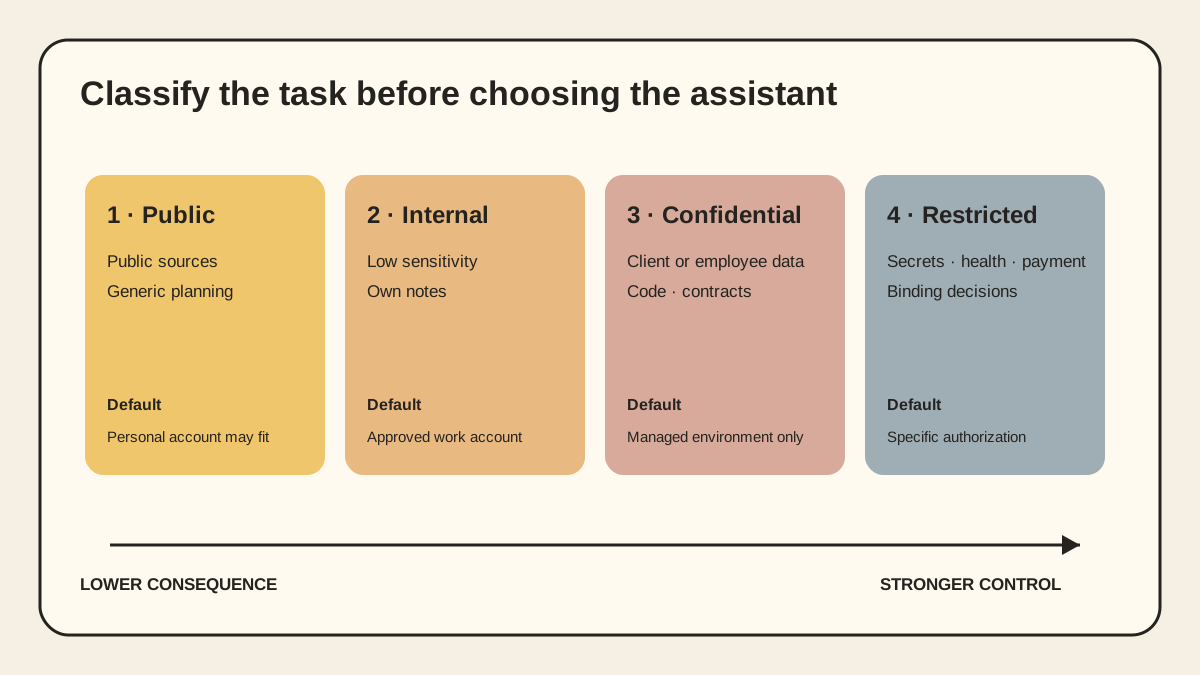
| Level | Example | Sensible default |
|---|---|---|
| Public | Summarize a public report; brainstorm generic agenda questions | Personal assistant may be acceptable if policy allows |
| Internal, low sensitivity | Rewrite your own non-confidential notes; format a generic checklist | Prefer approved work account; remove identifiers |
| Confidential or personal data | Client files, employee data, unpublished financials, source code, contracts | Use only an explicitly approved managed environment and minimum necessary data |
| Restricted or high consequence | Credentials, health records, payment data, privileged legal material, security secrets, binding decisions | Do not use without specific authorization, controls, and accountable review |
Classification depends on content and consequence, not file format. A harmless-looking spreadsheet may contain customer identifiers. A public template may become confidential after it includes pricing or strategy. A prompt can itself reveal sensitive facts even when no file is uploaded.
NIST's Generative AI Profile recommends aligning risk management with the use case, legal requirements, risk tolerance, and lifecycle. For an individual user, that translates into documenting the task, data source, intended output, reviewer, and failure impact before choosing a feature.
Pick the Delivery Shape That Matches the Work
Chat or desktop assistant
Best for interactive research, drafting, comparison, and analysis. The person remains in the loop, and the output is visible before it leaves the conversation. It is a poor fit for unattended actions or work that depends on many live systems.
Browser extension or connected app
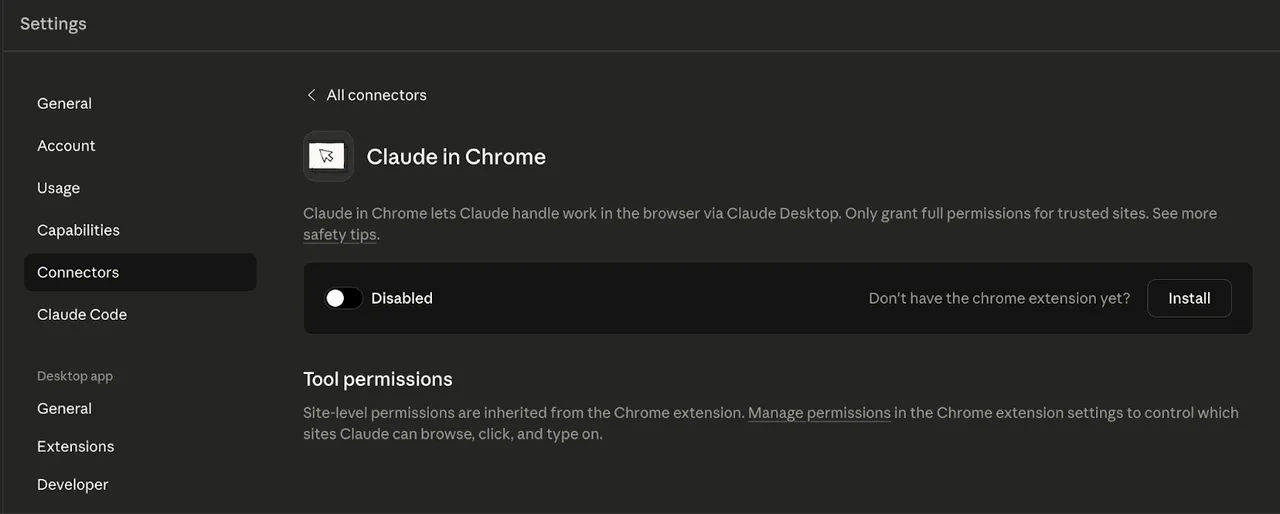
Best when the task lives inside email, calendars, documents, or a web application. The convenience comes from broader access. Review each connection separately: read versus write, which resources it reaches, whether the administrator enabled it, and what happens when it is disconnected.
Google's work-account connected-app documentation illustrates why details matter: availability varies by account, edition, location, language, and device; administrators control access; and each connected service has specific capabilities and limits.
Workspace or agent
Best for persistent projects, repeatable workflows, shared files, tools, and scheduled work. It requires more governance because context lasts longer and actions can cross systems. If all you need is help revising one paragraph, a persistent workspace is unnecessary.
The distinction between an AI assistant and an AI agent becomes important here: the more the system can choose steps and act, the more you must evaluate permissions, approvals, logs, and recovery—not only answer quality. The agent connector guide provides a second checklist for OAuth scope, write authority, and revocation.
Privacy and Account Questions to Verify
Read the documentation for the exact product, plan, account type, region, and feature. Record the date because defaults change.
Ask:
- Are prompts, files, outputs, feedback, and connected-app data used for model improvement?
- What is stored when activity or history is on, and what remains when it is off?
- What are the default and configurable retention periods?
- Can a human reviewer access content, and under what conditions?
- Which subprocessors and processing regions apply?
- Can the employer administer the account, connections, sharing, and deletion?
- Are public links, shared projects, memory, and connectors enabled?
- What audit or compliance logs are available?
- What happens to data after account closure or employment termination?
Do not treat “not used for training” as equivalent to “not stored.” Training, product history, abuse monitoring, support access, backups, and enterprise audit logs are separate questions. Also do not assume deleting one chat removes files, memories, shared links, or downstream copies.
Choose on Controls, Not Model Rankings
For personal work use, evaluate:
- Account boundary: personal only, or an employer-managed identity with SSO and admin control?
- Data controls: clear retention, deletion, training, sharing, and residency terms?
- Permission granularity: can you connect one resource read-only instead of an entire account?
- Source handling: does research output expose citations and distinguish source text from generated interpretation?
- Context control: can you isolate projects, disable memory where appropriate, and remove stored context?
- Export and portability: can you retrieve instructions, files, and useful outputs without the vendor?
- Review controls: can the tool remain draft-only and require approval before external actions?
- Cost boundary: what limits, seats, credits, connector charges, or shared allowances apply?
Benchmark scores rarely answer these questions. A slightly better response is not worth an unmanaged account or an unclear data flow.
A Practical Deployment Pattern
Start with one approved, low-risk task. Create a written use statement: “The assistant may transform these inputs into this draft; it may not send, publish, decide, or connect to other systems.”
Then:
- Use a work-managed account if one is available.
- Remove unnecessary names, identifiers, and attachments.
- Provide the minimum excerpt rather than the full repository or mailbox.
- Keep source material separate from generated output.
- Require a person to verify facts, citations, tone, and policy compliance.
- Do not let the assistant make commitments, approvals, employment decisions, payments, or production changes.
- Save the accepted output in the organization's system of record, not only in chat history.
- Revoke unused connectors and review memory, sharing, and public-link settings.
For recurring work, document the prompt or instruction, expected input, acceptance criteria, reviewer, prohibited data, and escalation path. That turns an improvised habit into a controllable workflow.
A Seven-Day Evaluation
Use real but approved examples. Do not start by uploading the most sensitive document available.
Days 1–2: Baseline and low-risk drafts. Measure the current time and quality for three repeated tasks. Run the assistant on sanitized inputs. Record editing time, not only generation time.
Day 3: Research. Require citations. Open every material source and note unsupported claims, outdated details, and missing counterevidence.
Day 4: Document work. Test a representative file. Check whether formatting, tables, comments, and references survive—not merely whether the summary sounds fluent.
Day 5: Context and privacy. Inspect history, memory, sharing, connector permissions, retention, export, and deletion. Test disconnect and removal.
Day 6: Failure cases. Give ambiguous instructions, conflicting sources, missing information, and a request that should be refused or escalated.
Day 7: Decide. Compare accepted-output rate, correction time, factual error rate, policy exceptions, data exposure, and full cost. Choose adopt, restrict, redesign, or stop.
Do not use “time saved” alone. An assistant that drafts quickly but requires extensive verification may move work rather than remove it.
Original visual references
These images are restored from the article's original publication to preserve interface, workflow, and comparison context. Any product UI, pricing, benchmark result, or model availability shown is a historical capture; verify current official information before making a decision.
Personal Convenience Does Not Override Work Accountability
An AI assistant can be valuable for drafting, research, organization, and reflection. The safe choice is not necessarily the product with the longest feature list. It is the arrangement that fits employer policy, uses the right account, limits data and permissions, preserves human review, and leaves accepted work in the correct system of record.
Treat personal AI at work as a small deployment, not a private shortcut. Define the boundary before the first upload.
Related posts

Local-First vs Cloud Agent Workspaces: Which Fits?
Compare local-first and cloud agent workspaces across files, privacy, background execution, connectors, reliability, and control—then…
Best Markdown Editors in 2026 — Ranked by Workflow, Not Features
Obsidian, Typora, VS Code, Zettlr, iA Writer and more, ranked by workflow fit. What each editor trades away, and where browser tools beat…
Math in Markdown: LaTeX Syntax and Where It Renders
How math in markdown works: dollar-sign LaTeX syntax, where it renders (GitHub, Obsidian, Jekyll), the KaTeX vs MathJax split, and honest…
https://floatboat.ai/blog/ai-assistant-for-personal-use-at-work