
Agentic AI Tools for Real Work
Agentic AI tools help with multi-step work, but choosing one requires checking oversight, context, permissions, and failure handling.
The best agentic AI tool is not the one that can do the most. It is the one whose operating boundary matches the job you are willing to delegate.
“Agentic AI tools” now covers several different products: an assistant that calls a tool while you watch, a scheduled workflow that moves records between apps, a builder that lets a model choose its next action, a coding agent that edits a repository, and a workspace agent that works across files and connected services. They differ less by model intelligence than by where they run, what they can reach, how long they continue, and who approves consequential actions.
This is a selection framework, not a ranking. Vendor documentation establishes current capabilities, but a feature list does not prove reliability. Start with a workflow, an acceptable failure, and a recovery plan.
What Makes an AI Tool Agentic?
An assistant turns a prompt into a response. An agent works through a loop: observe context, choose an action, use a tool, inspect the result, and decide what comes next. The useful dividing line is not whether the product uses the word “agent.” It is whether the system can choose and execute multiple steps toward a goal.
Four variables determine the practical level of autonomy:
- Scope: one document, one application, a repository, or several connected systems.
- Duration: one interactive turn, a long-running task, a schedule, or an event-driven service.
- Authority: read, draft, edit, send, purchase, deploy, or delete.
- Supervision: continuous steering, approval gates, exception-only review, or unattended execution.
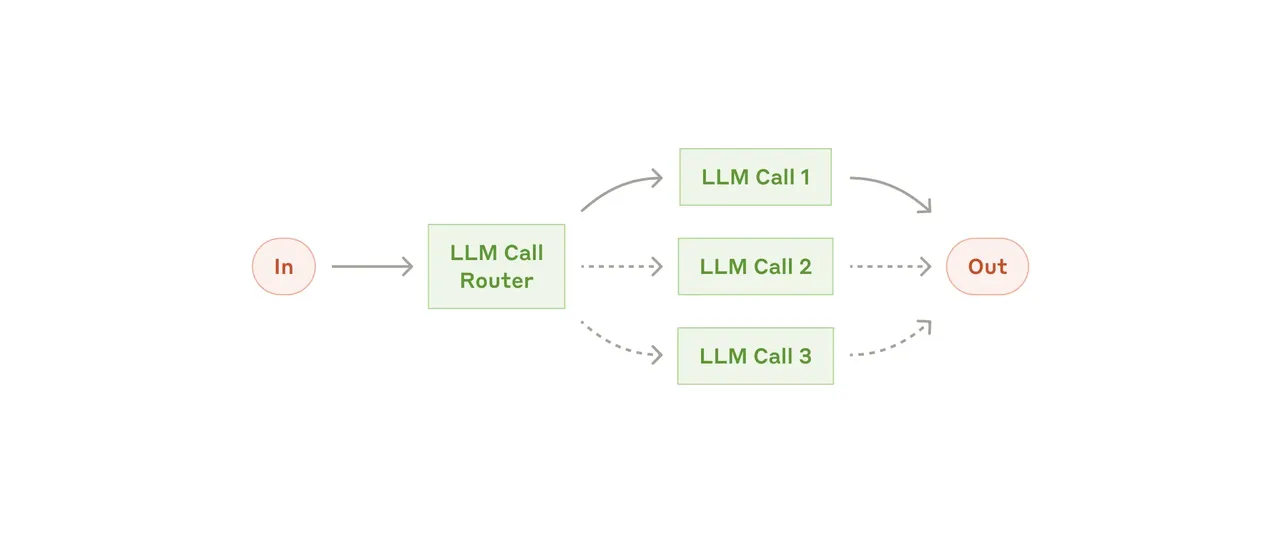
Anthropic's research on effective agents distinguishes workflows, where code controls the path, from agents, where the model directs its own process. Neither is inherently better. A deterministic workflow is usually preferable when the route is known; agent judgment becomes valuable when inputs vary and the next step cannot be fully enumerated.
Five Categories of Agentic AI Tools
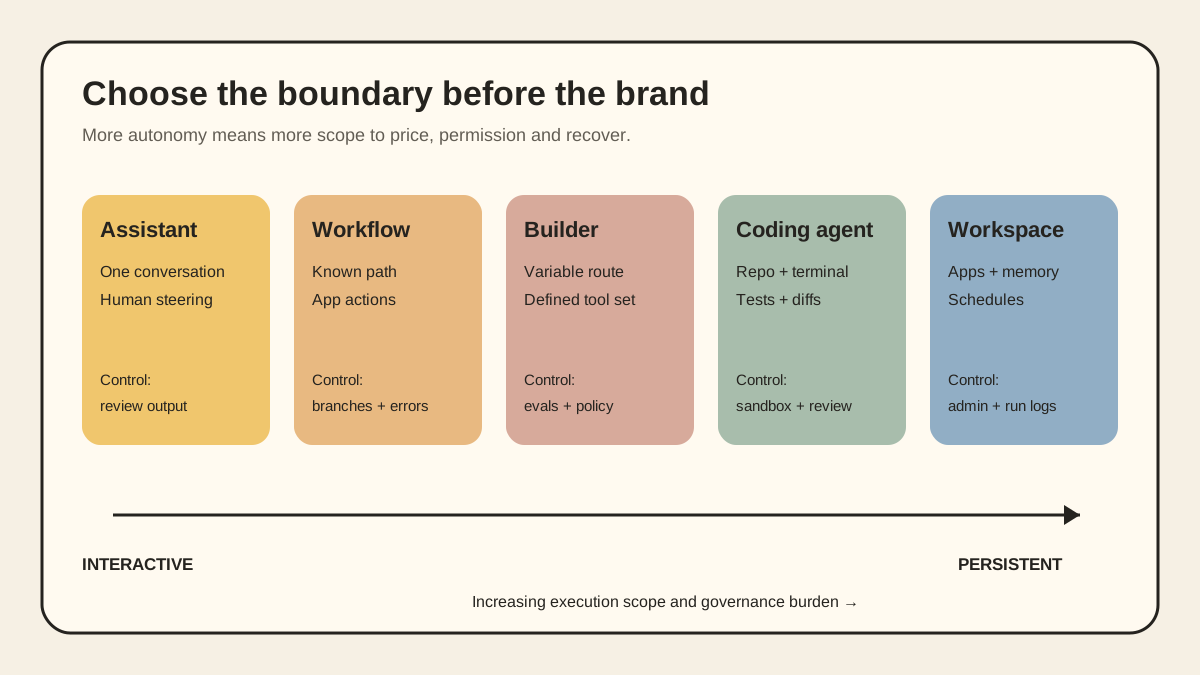
| Category | Best fit | Typical reach | Main control | Main cost unit |
|---|---|---|---|---|
| Tool-using assistant | Research, drafting, analysis | Current chat, files, approved tools | User stays in the conversation | Seat or message allowance |
| Workflow automation | Repeated, structured operations | Connected apps and predefined steps | Triggers, branches, error routes | Task, operation, or credit |
| Agent builder | Variable workflows needing judgment | Configured knowledge, tools, channels | Tool policy and evaluations | Run, action, token, or credit |
| Coding agent | Repository and technical work | Files, terminal, tests, version control | Sandbox, approval, review | Seat, allowance, credit, or token |
| Workspace agent | Long-running cross-app work | Files, memory, apps, schedules | Workspace permissions and logs | Seat plus usage or credits |
The table maps categories, not brands. Products increasingly cross rows. Compare the exact execution surface you will use.
Tool-Using Assistants
Chat assistants are the lowest-friction choice for research, synthesis, planning, and drafting when a person remains present. Add files, ask for a comparison, inspect the answer, then redirect. Their weakness is persistence: a good conversation is not automatically a repeatable process, and a search or file tool does not make the assistant safe to send messages or change records unattended.
Choose an assistant when inputs vary, output is easy to inspect, and the task ends in a document or recommendation. Do not buy an automation platform merely to avoid copying three files into a conversation once a month.
Workflow Automation With AI Steps
Zapier, Make, and n8n are strongest when the trigger and destination are known: a form arrives, a record is classified, a draft is created, and an exception is routed to a person. AI can interpret unstructured text without taking control of the whole process.
This category is easier to test because the workflow graph exposes the path. Its cost can be less obvious. Zapier defines a task as a successful action and also counts Agents activities such as actions, browsing, and knowledge lookups. Make's AI agent credit documentation separates operations, called tools, and model-token consumption. A cheap-looking run can multiply when it loops or invokes several tools.
Use workflow automation for stable, high-frequency work with explicit inputs and outputs. Avoid it when every case requires a new plan or when the apparent workflow is really an unresolved business rule.
No-Code and Low-Code Agent Builders
Agent builders let an operator define a role, knowledge sources, tools, memory, and deployment channel. They fit work where the goal is stable but the route varies: triaging requests, researching an account, or preparing a first response from several systems.
The critical feature is not the visual builder. It is the evaluation and control surface. Can you replay a failed run, pin prompt versions, inspect every tool call, separate development credentials, require approval for external actions, and export instructions and test cases?
Use a builder after the task has enough examples to evaluate. If the team cannot describe a correct result, the platform hides ambiguity rather than solving it.
Coding Agents
Coding agents have unusually strong feedback mechanisms: diffs, tests, linters, type checks, and version control. An agent can inspect a repository, change files, run validation, and revise its patch before a developer reviews it.
The access also creates risk. OpenAI says Codex runs in a sandbox with network access disabled by default and asks before elevated actions; its guidance still recommends review before deployment. Anthropic's Claude Code CLI reference exposes allowed and disallowed tools, turn limits, permission modes, and an explicitly named --dangerously-skip-permissions option. These controls matter more than a benchmark score when an agent can execute shell commands.
Choose a coding agent for scoped tasks with clean rollback and machine-checkable acceptance criteria. Do not delegate production credentials, irreversible migrations, or deployment authority simply because a patch passes tests.
Workspace Agents
Workspace agents combine persistent context, files, tools, memory, schedules, and collaboration. They fit work where the costly part is the handoff between research, documents, messages, and review.
OpenAI's current workspace-agent documentation describes cloud runs, schedules, connected apps, shared use in ChatGPT or Slack, and administrator visibility through the Compliance API. That breadth is the appeal—and why governance must precede convenience. A cross-app agent can inherit several permission systems at once.
Choose a workspace when a process genuinely spans artifacts and applications and shared context should outlive one chat. Avoid it for a single deterministic integration or data that cannot enter the workspace's processing boundary.
Choose by Workflow, Not by Logo
| Workflow | Sensible starting category | Why | Keep a person at |
|---|---|---|---|
| Compare sources and draft a brief | Assistant | Inputs vary; output is inspectable | Source verification and final claims |
| Route forms and create records | Workflow automation | Trigger, fields, destination are explicit | Exceptions and duplicates |
| Triage support with variable evidence | Agent builder | Route varies within a defined tool set | Refunds and account changes |
| Fix an issue and run tests | Coding agent | Files and tests provide feedback | Diff review, secrets, merge, deploy |
| Prepare a weekly cross-app review | Workspace agent | Needs persistent artifacts and schedules | External communication and commitments |
A strong pilot task is repeated, bounded, observable, reversible, and valuable even if a person approves the last step. A weak candidate has subjective success, few examples, broad permissions, or a failure that creates a legal, financial, or customer commitment.
Compare Total Cost, Not the Headline Plan
Agentic tool pricing rarely reduces to one subscription. A realistic model includes:
- seats and minimum plan requirements;
- tasks, operations, agent activities, or credits;
- model input, output, caching, search, storage, and computer-use charges;
- retries, loops, evaluations, and failed runs;
- paid connectors or premium applications;
- human review, incident recovery, and maintenance after APIs change.
Use one representative workflow and calculate cost per accepted outcome, not cost per run. If 100 runs produce 70 usable results, divide the full spend—including review and retries—by 70. Test the worst plausible branch too: a workflow that normally calls two tools may call ten when data is missing.
Pricing changes frequently. Record the pricing page and check date in the pilot document instead of embedding a permanent monthly figure in the architecture.
Permissions and Data Boundaries
An agent may have a workspace role, connected-app OAuth grant, service-account privileges, provider retention rules, a browser session, filesystem access, and its own approval policy. Review each layer separately.
Before connecting production data, answer:
- Can it only read, or can it create, send, edit, and delete?
- Are grants per user, per workspace, or through a shared service account?
- Can administrators inventory agents, tools, credentials, and runs?
- Are logs sufficient to reconstruct decisions and tool calls?
- Where are prompts, files, memory, and outputs stored, and for how long?
- Can external content carry instructions into another connected system?
- Can a reviewer stop a run and revoke credentials without deleting the workspace?
Grant the smallest scope that completes the pilot. Use test accounts and non-sensitive data first. Keep payment, identity administration, production deployment, destructive deletion, and binding customer communication behind explicit approval.
Portability: Plan the Exit Before the Pilot
An agent becomes expensive to replace when its value is trapped in proprietary prompt fields, opaque memory, vendor-only connectors, and run history that cannot be exported. Portability does not require every component to be open source. It requires the important operating knowledge to exist outside the product.
Keep operating instructions in version control. Store test cases and acceptance criteria in a neutral format. Prefer standard files and documented APIs. Maintain a list of tools, scopes, owners, and secrets. Separate business rules from vendor-specific connector configuration.
That is why a build-or-buy decision for agentic systems must include migration effort, not just launch speed.
A Two-Week Pilot That Produces Evidence
Do not begin with “roll out an AI agent.” Begin with one workflow and a baseline.
- Define 20–50 representative cases. Include ordinary work, missing data, conflicting instructions, duplicates, and a malicious or irrelevant input.
- Write acceptance criteria first. Specify required fields, forbidden actions, source requirements, completion state, and escalation conditions.
- Measure the current process. Capture human time, elapsed time, error rate, and volume.
- Start read-only or draft-only. Keep sending and mutation behind approval.
- Inspect every pilot run. Record accepted output, corrected output, unsafe attempt, tool failure, and unexplained stop.
- Calculate accepted-outcome cost. Include usage, review, rework, and maintenance.
- Expand one permission at a time. Add authority only after the relevant failure has a control and rollback.
At the end, choose among expand, redesign, keep as assisted work, or stop. A pilot that proves the task should remain human-led is still useful.
Original visual references
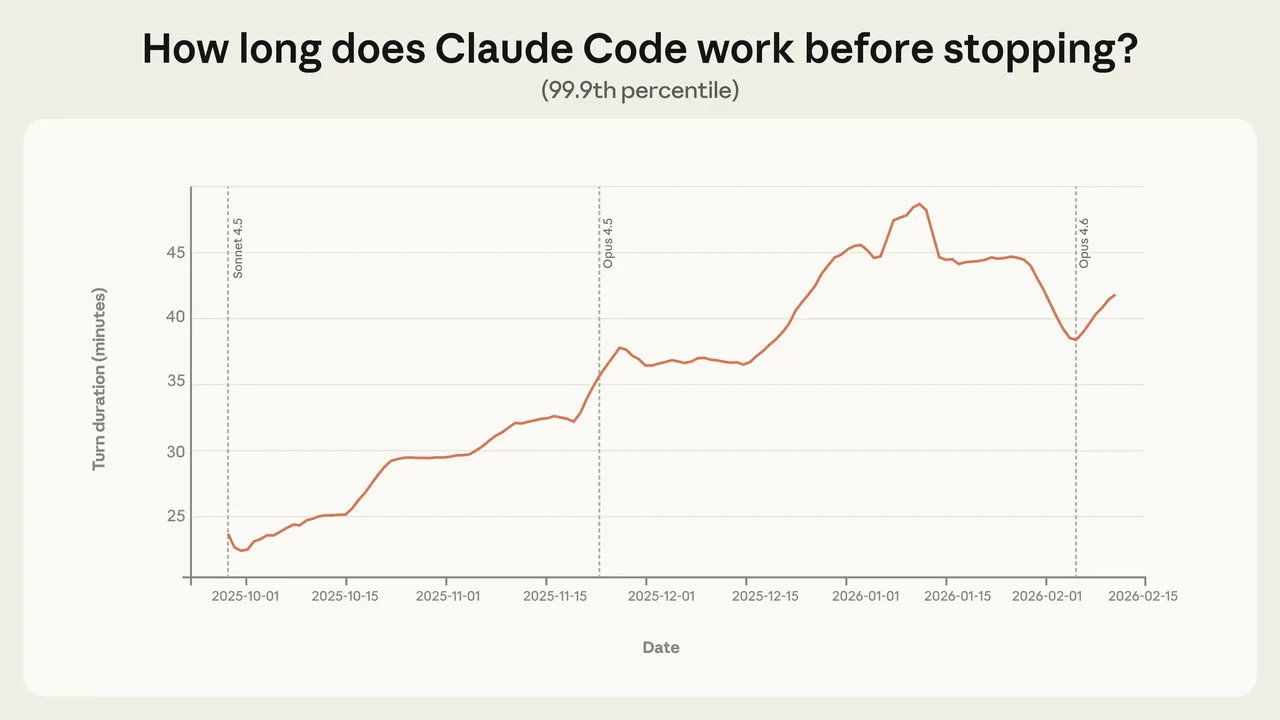
These images are restored from the article's original publication to preserve interface, workflow, and comparison context. Any product UI, pricing, benchmark result, or model availability shown is a historical capture; verify current official information before making a decision.
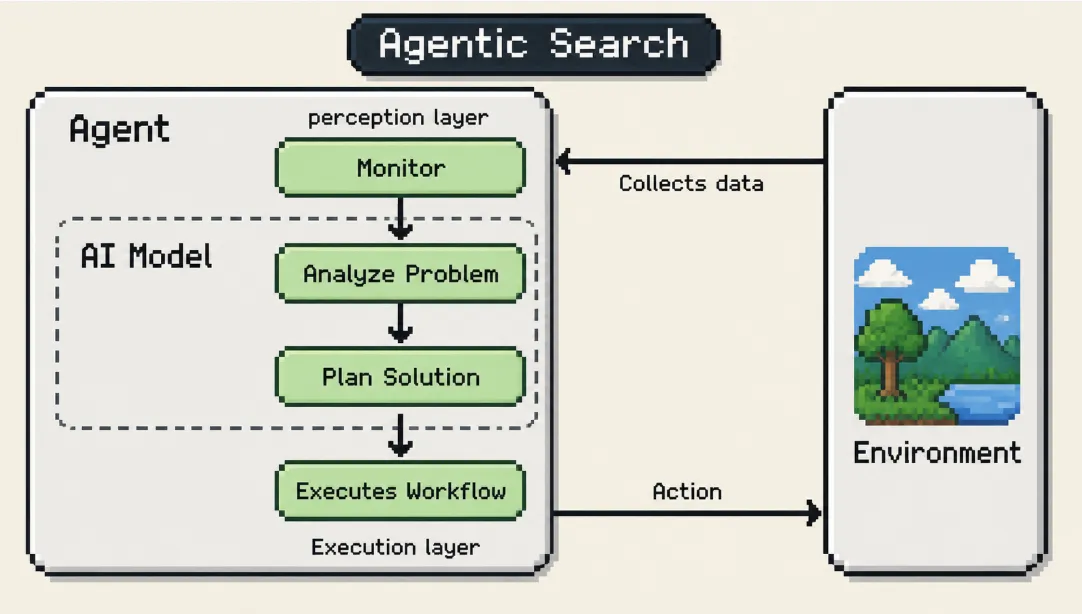
The Shortlist Is a Control Decision
There is no universal best agentic AI tool. Assistants optimize interactive judgment. Workflow platforms optimize repeatability. Builders add flexible routing. Coding agents exploit technical feedback. Workspaces coordinate long-running work across artifacts and services.
Shortlist the category first. Then compare products on the workflow you will actually run: permission granularity, observable logs, approval points, failure recovery, accepted-outcome cost, and portability. Capability earns a trial; control and evidence earn a place in production.
Related posts

Local-First vs Cloud Agent Workspaces: Which Fits?
Compare local-first and cloud agent workspaces across files, privacy, background execution, connectors, reliability, and control—then…
Best Markdown Editors in 2026 — Ranked by Workflow, Not Features
Obsidian, Typora, VS Code, Zettlr, iA Writer and more, ranked by workflow fit. What each editor trades away, and where browser tools beat…

Math in Markdown: LaTeX Syntax and Where It Renders
How math in markdown works: dollar-sign LaTeX syntax, where it renders (GitHub, Obsidian, Jekyll), the KaTeX vs MathJax split, and honest…
https://floatboat.ai/blog/agentic-ai-tools